
ASI:Work: How Fetch.ai Is Bringing AI Agents to Your Desktop
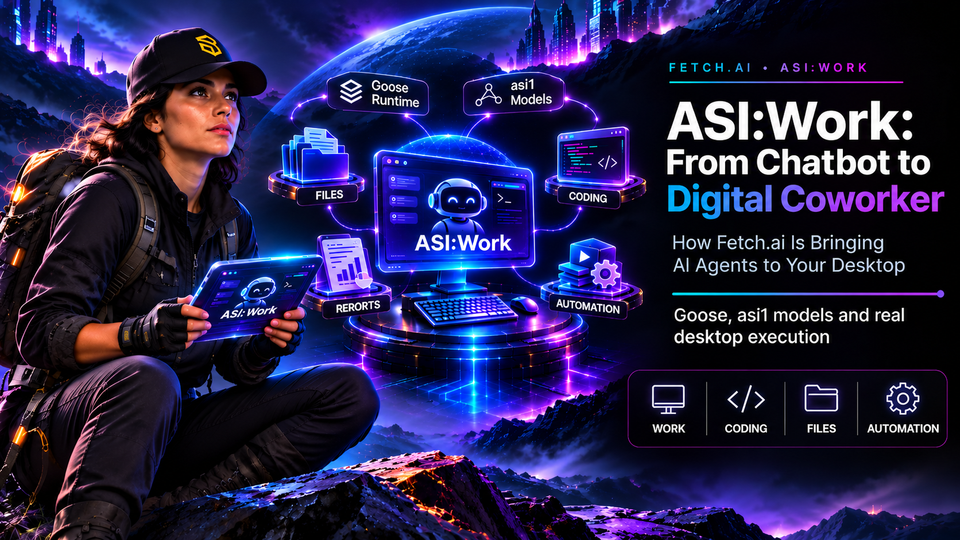
From chatbots to digital coworkers: a closer look at ASI, Goose, the asi1 models, and the next step in agentic AI.
Your AI just wrote a perfect 10-step plan.
Excellent.
Now, who's going to execute those ten steps?
For years, AI assistants have been remarkably good at explaining how to complete tasks. They can write instructions, generate code, analyze information, and suggest workflows.
But once the conversation ends, a familiar problem remains.
Someone still has to open the files, copy the answers, update the spreadsheets, organize the documents, and run the commands.
Fetch.ai wants to shorten the distance between asking AI for help and getting actual work done.
With ASI, introduced in October 2026 and now available on Linux alongside macOS and Windows, Fetch.ai is bringing agentic AI directly into the desktop environment.
The concept is straightforward: instead of giving an AI a question, give it a workspace and a mission.
Let's explore how it works, what powers it, and what this new application means for the broader Fetch.ai ecosystem.
1. Meet ASI:Work: Your New Digital Coworker
Imagine hiring a digital colleague.
On their first day, you don't give them a mountain of screenshots and ask them to explain what you should do next.
You show them where the documents are, explain the assignment, and let them get started.
That is the basic philosophy behind ASI.
Built into the desktop version of ASI, the application allows users to select a folder on their computer and describe a task in natural language.
The agent can then work with the files in that folder, using supported tools to perform operations such as:
- Reading and analyzing documents.
- Creating reports and structured files.
- Editing and reorganizing existing content.
- Cleaning spreadsheets and CSV data.
- Inspecting code and executing development commands.
This places ASI in the emerging category of desktop AI agents, alongside products such as Claude Cowork and agentic coding environments like OpenAI Codex.
The applications differ in architecture and capabilities, but they share an important objective: moving AI from generating instructions toward executing useful work.
ASI approaches this through the ASI desktop application, using the models and agent runtime selected by Fetch.ai.
Two ways to get things done
ASI supports two main workflows.
📁 Work — The everyday productivity assistant
Designed for documentation, research materials already available in the workspace, content creation, reporting, data organization, marketing, and operational tasks.
For example, a marketing team could ask it to organize campaign assets, compare documents, and prepare a weekly report.
💻 Coding — The developer's digital teammate
Focused on local software projects.
The agent can inspect a repository, suggest code changes, edit files, and run relevant commands or tests.
For developers, this creates an opportunity to reduce the repetitive work involved in maintaining and updating projects.
The idea is not to eliminate human expertise.
It is to give people more time to use it.
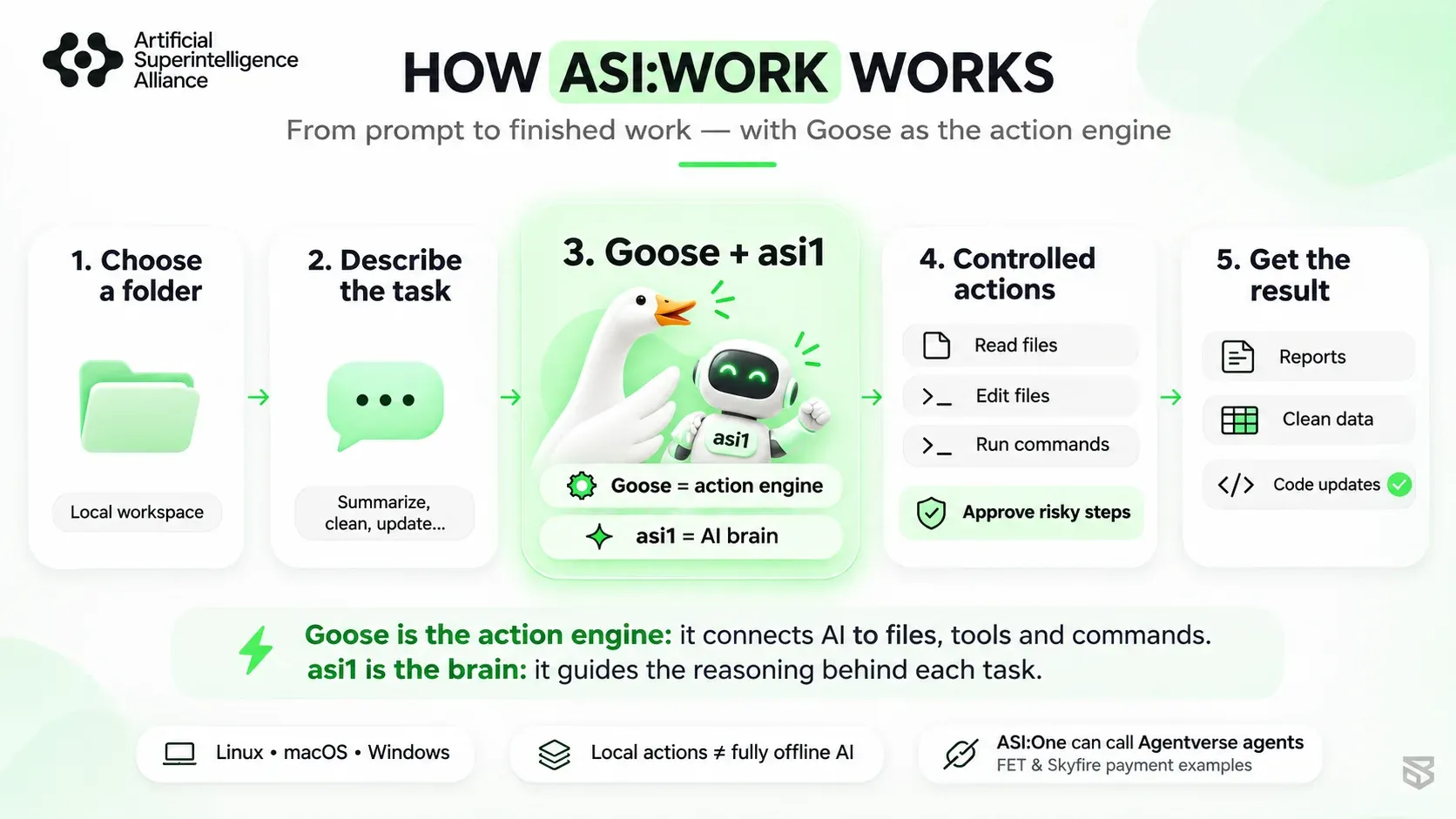
2. Under the Hood: Meet Goose and the asi1 Models
Here is where things get particularly interesting.
ASI combines two essential components:
A reasoning system capable of interpreting instructions and an agent runtime capable of interacting with real tools.
Think of a small workshop.
The AI model is the brain that understands the assignment.
The agent runtime provides the hands that can operate the equipment.
🪿 Goose: The Open-Source Action Engine
At the heart of ASI is Goose, an open-source AI agent originally developed by Block and released under the Apache-2.0 license.
Goose is designed to connect language models with practical operations such as reading files, modifying code, running terminal commands, and interacting with tools.
In simple terms:
Goose helps turn an AI model's instructions into actions.
Rather than having the model merely describe how to reorganize a folder, an agent equipped with the appropriate tools can perform those operations.
Developers can explore the Goose open-source project on GitHub.
🧠 asi1: The Reasoning Layer
Fetch.ai connects Goose to the asi1 model family, which is used across ASI.
According to ASI's published open-source documentation, the family includes:
| Model | Open-weight foundation | Positioning |
|---|---|---|
| asi1-mini | Qwen3 | Fast, lightweight tasks |
| asi1 | GLM-5.3-Flash | General-purpose tasks |
| asi1-ultra | GLM-5.3 | More demanding reasoning and coding |
These models provide the intelligence guiding the task, while Goose supplies the agent runtime and connects that intelligence to the available tools.
The relationship is easier to understand as:
User intention → asi1 reasoning → Goose tool execution → Reviewable results
This separation matters because an intelligent model cannot directly modify a spreadsheet or execute a terminal command without an execution environment capable of carrying out those actions.
Goose provides that foundation.
Does everything run locally?
Not necessarily.
ASI performs desktop operations on the user's computer, but local execution should not be confused with fully offline AI inference.
The fact that an agent reads and edits local files does not, by itself, prove that every model computation happens locally.
Fetch.ai also provides the asi1 family through ASI's API infrastructure.
For privacy-sensitive environments, users should therefore distinguish between local file storage, the information sent for model processing, and the permissions granted to external tools.
Similarly, Goose being open source does not automatically mean every component of the complete ASI application is open source.
The important takeaway is that Fetch.ai has chosen an identifiable open-source agent foundation rather than presenting the entire execution layer as an unexplained black box.
3. From a Simple Prompt to a Finished Task
Let's move from architecture to something more concrete.
Imagine a content manager preparing a weekly activity report.
Their project folder contains meeting notes, campaign drafts, spreadsheets, and various working documents.
Usually, preparing the report requires opening multiple files, extracting relevant information, organizing it, and writing the final summary.
With ASI, the user could instead provide a task such as:
Review the documents in this project folder. Identify the completed work, outstanding tasks, and important figures. Create a concise weekly report with priorities for next week.
The agent can inspect the available material, organize the relevant information, and produce a new document for review.
The objective is to reduce the manual steps between the initial request and the finished deliverable.
Three practical use cases
📊 Data and reporting
Give the agent a folder of CSV files and ask it to clean the data, standardize the formatting, and prepare a summary.
📝 Content and operations
Ask it to transform meeting notes into action items, reorganize project documentation, or draft a campaign based on existing materials.
🛠️ Software development
Point it at a local code repository, describe a required change, and let the coding workflow inspect relevant files, propose modifications, and run tests.
These examples reflect workflows described in Fetch.ai's product documentation.
They illustrate the intended capabilities, rather than independently measured performance guarantees.
And this is precisely where agentic AI becomes compelling.
Instead of repeatedly moving information between a chatbot and several applications, the user can assign a task directly within the environment where the work already exists.
4. Rules, Skills, and Scheduled Tasks: Teaching AI How You Work
Completing one task is useful.
But what happens when you need to complete the same task every week?
ASI introduces several mechanisms designed to make recurring work more consistent.
🔁 Rules: Teach the Agent Your Preferences
Rules allow users to specify how the agent should approach a task.
For example:
- Always use our company's tone when drafting reports.
- Keep executive summaries under one page.
- End every weekly update with next steps.
According to Fetch.ai's documentation, rules are applied within the current Work task.
They make it possible to guide future responses and modifications without repeating the same instructions every time.
🧩 Skills: Reusable Workflows
A Skill represents a reusable way of completing a task.
Imagine an IT team with a standard procedure for handling support requests.
Rather than manually explaining that procedure every time, the team can use a skill that captures the relevant steps and checks.
Skills enabled in ASI's Skills Library are documented as available to ASI.
The distinction is simple:
Rules describe how you want the agent to behave. Skills describe a workflow it can follow.
⏰ Scheduled Tasks: Put Routines on a Calendar
ASI also supports scheduled work.
Users can configure recurring tasks on an hourly, daily, weekday, or weekly basis.
Consider a team that prepares the same status report every Monday.
Instead of remembering to request it each week, the team can define the task and its schedule.
There is, however, one practical limitation: scheduled jobs depend on the desktop application running and the computer remaining awake.
The official documentation also describes a catch-up mechanism for the latest missed run within the preceding week.
This makes Scheduled Tasks a useful desktop automation feature, although it should not be confused with an always-on cloud service.
5. Beyond Local Files: Connectors and Mini-Apps
Most professional workflows do not live entirely inside folders.
Project information may be spread across analytics platforms, design tools, monitoring dashboards, and other services.
ASI's Connectors extend its reach beyond the local workspace.
Fetch.ai's October 30 documentation describes integrations involving tools such as:
- Sentry, for monitoring application errors.
- Mixpanel, for product analytics.
- Langfuse, for AI application observability.
- Figma, for accessing design information.
These connectors are optional and require appropriate configuration or authorization.
For example, a team could use a connected monitoring service to identify recurring errors and prepare a status summary.
This brings external information into an agent-assisted workflow without requiring users to manually collect everything first.
Building a Small App Without Starting From Scratch
Another interesting feature is the ability to create small utility applications.
Instead of asking the AI to repeatedly format a checklist, users can request a dedicated checklist application.
The official examples include trackers, simple dashboards, calculators, and card-based interfaces.
These mini-apps are stored in ASI's Apps area and can be reopened or refined later.
It is an interesting progression:
A prompt can produce an answer, a document, or even a reusable tool.
That gives AI-assisted work a more permanent result than a conversation that disappears into chat history.
6. Autonomy Still Needs a Steering Wheel
Giving an AI access to real files is useful.
It also changes the responsibility of the system.
A poorly interpreted instruction might overwrite a document, reorganize the wrong files, or execute an unwanted command.
ASI addresses this with workspace selection and approval mechanisms.
The user chooses the folder used for the task, while sensitive actions can trigger approval cards.
The October 28 getting-started guide states that actions considered risky require approval by default.
This gives users opportunities to inspect and authorize operations before allowing them to proceed.
Of course, approval controls are not a substitute for backups, appropriate operating-system permissions, or reviewing important results.
There is also an important difference between a natural-language rule and a technically enforced security boundary.
Telling an agent not to modify certain files is helpful guidance, but it should not be mistaken for a complete filesystem security policy.
The most useful form of autonomy is one that remains understandable, observable, and controllable.
That principle becomes increasingly important as AI agents gain access to more tools and external services.
7. ASI on Linux: Why It Matters
Linux holds an important place in the worlds of software development, infrastructure, and open-source technology.
It is widely used by developers, system administrators, and organizations operating their own technical environments.
The expansion of ASI to Linux therefore makes the application relevant to another important audience.
As of November 2, 2026, Fetch.ai's updated announcement describes support for:
- macOS, including Apple Silicon and Intel.
- Windows 10 and 11.
- Linux, with
.deband.rpmpackages.
This broader desktop availability matters for teams that want to integrate agentic workflows into their existing operating systems rather than adopting an entirely new environment.
It does not automatically make ASI decentralized or fully independent from cloud infrastructure.
But it does make the desktop agent experience accessible across more computing environments.
For developers and infrastructure operators, that is a practical step forward.
8. Where Does Web3 Fit Into the Picture?
This is where the larger Fetch.ai ecosystem becomes especially relevant.
ASI is a desktop productivity application.
But Fetch.ai is also developing infrastructure intended to help independent AI agents discover one another, communicate, coordinate tasks, and interact with services.
Several components contribute to that broader vision.
Agentverse: A Network of Specialized Agents
Agentverse provides an environment for building, hosting, and discovering agents.
Through its documented Planner Mode, ASI can search Agentverse for specialized agents, communicate with them, and incorporate their results into a larger workflow.
Imagine a network of independent digital specialists.
One retrieves information.
Another processes data.
Another provides a specialized service.
The orchestration layer helps coordinate their contributions.
This is one direction in which Fetch.ai is developing the wider agent economy.
Agent Payments: When AI Services Can Transact
The Fetch.ai Innovation Lab also documents an Agent Payment Protocol designed to support payment interactions between agents.
Its specification defines messages for requesting, accepting, rejecting, completing, or canceling payments.
The documented payment methods include:
- FET, through direct on-chain transfers.
- USDC, through Skyfire.
- Stripe, for supported payment flows.
This makes it possible for developers to explore economic interactions between agents.
For example, a specialized agent could request payment for a service, while the requesting agent or user follows a defined approval and confirmation process.
It is worth distinguishing the protocol examples from complete production integrations: payment verification, authorization, and actual settlement depend on the implementation.
How Does This Connect to ASI?
Here, an important architectural distinction remains.
ASI documents agent discovery and communication through Agentverse.
The Fetch.ai developer ecosystem separately documents agent payment capabilities.
However, publicly available ASI documentation does not yet establish a direct native connection between its desktop workflow and the Agentverse payment infrastructure.
ASI should therefore be understood primarily as a desktop action environment, while Agentverse and the payment protocols form separate parts of the wider ecosystem.
Could these capabilities become more closely connected over time?
Architecturally, that is an interesting possibility.
But future integrations should not be presented as existing features until they are demonstrated.
For the Web3 community, the longer-term question is compelling: how might desktop agents, discoverable services, permission systems, and decentralized payment rails work together?
Fetch.ai is developing several of the building blocks.
The challenge is bringing them together into reliable, useful experiences.
9. What Makes ASI Interesting?
ASI enters a rapidly evolving market for desktop and coding agents.
Its existence alone does not prove that it is faster, more capable, or more secure than competing products. Those questions require independent comparisons and testing.
Its technical approach is nevertheless worth examining.
Three elements stand out.
First, the execution environment. Goose provides an open-source agent foundation that connects language models with files and practical tools.
Second, the model layer. Fetch.ai uses the asi1 family, built on open-weight model foundations, to guide the execution workflow.
Third, the broader ecosystem. ASI belongs to a platform where AI models, agent discovery, developer tooling, and payment protocols are being developed in parallel.
This combination creates an interesting direction for future agentic applications.
For users, the immediate value is simpler: fewer repetitive operations and more work completed directly inside existing projects.
For developers, the architecture provides another example of how open-source agent runtimes and language models can be combined into practical software.
For the Web3 ecosystem, it raises a larger question about the infrastructure that autonomous software will eventually need.
10. FAQ: ASI Explained
What is ASI?
ASI is a desktop AI agent environment integrated into ASI. It allows users to assign tasks involving local files, documents, data, and code, rather than receiving conversational answers alone.
Is ASI available on Linux?
Yes. Fetch.ai's updated November 2026 product information lists Linux support through .deb and .rpm packages, alongside macOS and Windows.
What is Goose in ASI?
Goose is an open-source AI agent runtime originally developed by Block. In ASI, it connects the asi1 model family with practical tools capable of reading files, making changes, and running commands.
Is ASI completely local and private?
ASI performs actions on the user's computer and Fetch.ai states that user prompts and data are not used for model training. This does not establish that all inference is offline or that connected services never receive relevant task data. Users should review the applicable privacy and access policies.
Does ASI use the FET token or blockchain?
No direct FET or on-chain dependency has been established for ASI's documented desktop workflows. Agentverse and payment protocols are available elsewhere in the Fetch.ai ecosystem, but should not be confused with built-in ASI functionality.
Can ASI automate recurring tasks?
Yes. It supports scheduled tasks, including hourly, daily, weekday, and weekly execution. The desktop application must be running and the computer must remain awake for scheduled execution.
Conclusion: AI Is Leaving the Chat Window
For years, AI assistants have been able to produce impressive instructions.
Now the industry is increasingly focused on something more practical: giving AI the tools and controlled access needed to complete the work behind those instructions.
ASI offers an example of this transition.
A user provides the objective.
The asi1 models guide the reasoning.
Goose connects the intelligence to practical tools.
And the desktop environment brings the results back to the user for review.
It is still an evolving product, with meaningful limitations and architectural distinctions to understand.
But the underlying direction is important.
The future of agentic AI will depend not only on increasingly capable models, but also on the infrastructure, permissions, interoperability, and tools that allow those models to become useful.
A brilliant AI can explain how to build the workshop. A useful agent can finally pick up the tools.
And that is where the next chapter of AI begins.
Sources and Further Reading
The following official documentation was consulted for this article, reflecting information available as of November 2, 2026.
- Fetch.ai / ASI — Introducing ASI — October 10, 2026.
- ASI — Official Product Page — Product overview and desktop features.
- Getting Started with ASI — October 28, 2026.
- ASI Open Source Architecture — Goose, asi1 models, and open-source components.
- Goose — Official GitHub Repository — Agent runtime source code.
- ASI Skills — October 28, 2026.
- ASI Rules — October 29, 2026.
- ASI Connectors — October 30, 2026.
- ASI Apps — October 31, 2026.
- ASI Scheduled Tasks — November 1, 2026.
- ASI — Planner Mode and Agentverse.
- Fetch.ai Innovation Lab — Agent Payment Protocol.
Support IBS Validator
We need your support! 🙏
At Inter Blockchain Services, we believe that open, interoperable infrastructure is essential for the future of decentralized networks and intelligent agents.
🛠️ We secure networks through professional validator operations.
🔌 We support interchain infrastructure and blockchain interoperability.
🌐 We help builders and users understand emerging technologies, decentralized AI, and the multichain ecosystem.
By delegating your FET to IBS Validator, you support our participation in securing the Fetch.ai network.
👉 Stake or Restake FET with IBS Validator

Expand Your Horizon with IBS
Want to stay informed about the latest developments in Fetch.ai, the ASI Alliance, Cosmos, and the decentralized AI ecosystem?
💬 Join our Discord community to explore emerging technologies and engage with the community.
🔁 Follow IBS Validator on X for infrastructure updates, research, educational threads, and insights into the evolving Web3 ecosystem.
🌐 Discover IBS services and learn more about our validator infrastructure, interchain operations, and ecosystem contributions.
Together, let's build a new decentralized world, one block and one intelligent agent at a time.